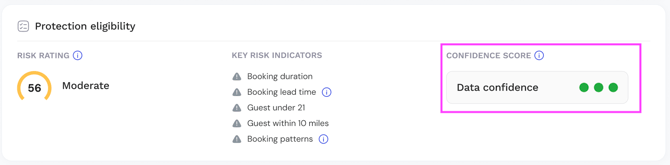
No other platform offers this, Truvi sits at the intersection of guest screening and damage protection, we have a unique view of what actually drives risk in a booking, and that's what powers Protection Eligibility.
The data-driven risk model looks at booking characteristics like property type, location, length of stay, and lead time to build a more accurate picture of risk, alongside our current guest screening.
What this means: a risk rating on every booking, the specific risk indicators behind it, and a clear Protected or Not Protected status directly in your dashboard.
Note: Protection Eligibility is only available for bookings with a protection product attached. If your program doesn't include protection, this section won't appear in your booking report.
Your Booking Report
Protection Status
Every booking now shows one of two protection statuses:
Protected — the booking is within our risk threshold. Protection applies and you'll be charged as normal.
Not Protected — the booking exceeds our risk threshold. Protection doesn't apply and you won't be charged. You'll receive an email notification so you can decide how to proceed.
Not Available — no protection product is applied to this booking, so no assessment has been run.

The previous Flagged status has been removed. Protection is now binary — a booking is either fully protected or it isn't. This applies to all new bookings going forward. Any bookings created before this change will continue to work as they did, so you may still see bookings showing partial protection in your dashboard.
Protection Eligibility
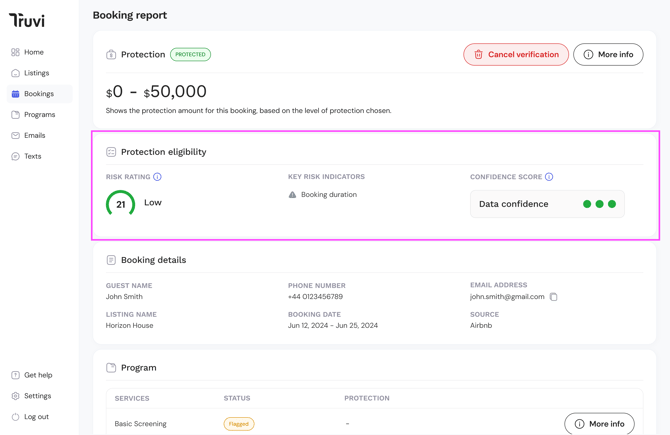
When you open an individual booking, the Protection Eligibility component shows the full risk assessment. This is only visible for bookings with a protection product attached.
It shows:
- Risk Rating — the overall risk rating for the booking
- Key Risk Indicators — the specific factors that contributed to the rating
- Confidence score — how much data the model had to work with
Risk Rating
Each booking receives one of four risk ratings:

Low — minimal risk indicators. Booking is protected.
Moderate — some risk indicators present. Booking is protected.
High — elevated risk indicators. Booking is protected.
Critical — exceeds our protection threshold. Booking is Not Protected and you won't be charged for protection.
Risk indicators
Where specific factors have contributed to the risk rating, you'll see them listed in the booking report. These include:
Booking duration — the stay is 21 days or longer
Lead time — the booking was made 1 day or less before check-in
Guest under 21 — the guest is under 21 years old
Guest within 10 miles — the guest lives within 10 miles of the property
Booking patterns — booking details match patterns associated with higher risk
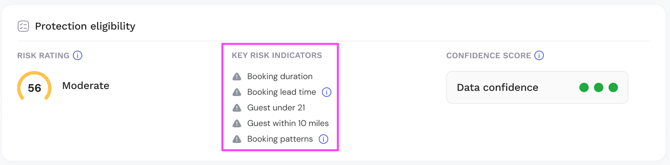
If none of these are triggered, the report will show: No major risk indicators identified.
Confidence Score
The Confidence score tells you how much data the model had available when assessing the booking. It's displayed as a traffic light indicator:
🟢 Green — plenty of data points available. The risk rating is reliable.
🟡 Amber — a reasonable amount of data available. The risk rating is a fair assessment but may not tell the full picture.
🔴 Red — limited data available. Treat the risk rating as a guide rather than a definitive assessment and use your own judgement alongside it.