
When your bookings update
Your bookings import every 15 minutes.
When you first connect a PMS, Truvi imports and screens your existing bookings, and emails you when it's done.
If you have no bookings yet, the page shows the time of the last successful import.
To open a full booking report, click anywhere on a booking row.
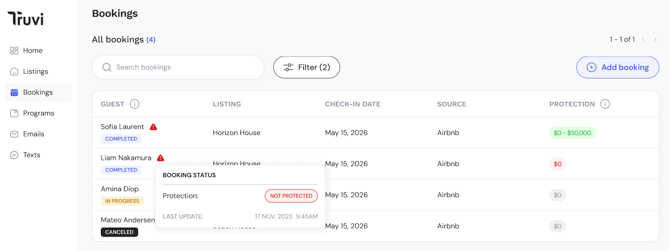
-1.png?width=670&height=279&name=image%20(15)-1.png)
Guest column
The Guest column shows the guest's name and their current Booking Status:
| Status | Meaning |
|---|---|
| Not Started | The booking has been created and screening is queued The booking has been created but the guest hasn't started their verification journey yet. If your program runs contactless screening, bookings will typically move straight to Completed — you'll mostly see Not Started on bookings where a guest journey is required and the guest hasn't begun it yet |
| In Progress | Screening checks are running or the guest journey has started |
| Completed | All screening checks are done |
| Cancelled | Verification was cancelled |
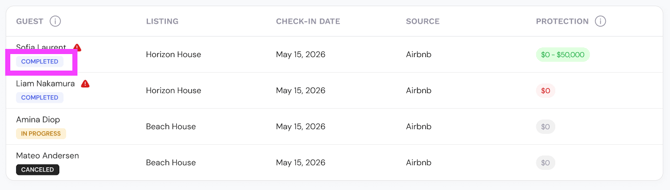
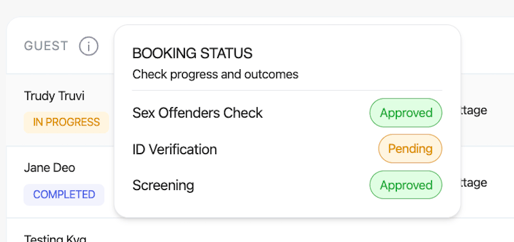
Hover over the Guest column on any row to see a breakdown of individual service statuses — for example, whether ID Verification, Sex Offender Check and Screening are each Approved, In Review, Pending, or Rejected.
Protection column
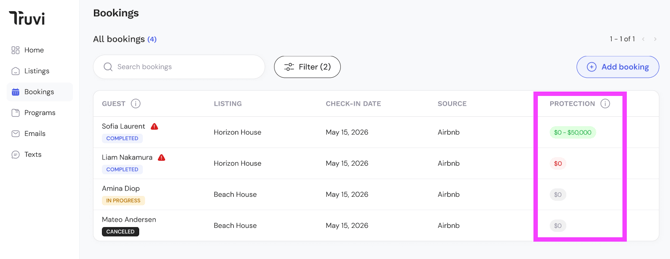
The Protection column shows the protection coverage range that applies to each booking (for example, $0–$50,000 or $500–$1,000,000), colour-coded based on protection status and risk level.
| What you see | Meaning |
|---|---|
| Green range (e.g. $0–$50K) | Booking is Protected |
| $0 (Red) | Booking is Not Protected — no protection charge applies |
| $0 (grey) | No protection product is applied to this booking. |
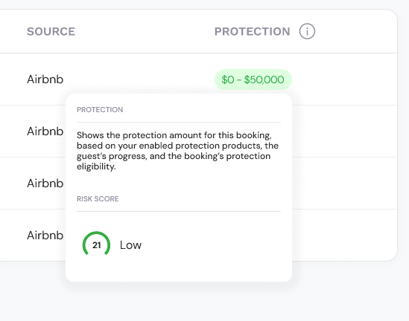
Hover over the Protection column to see the booking's risk score and context behind the protection decision.
Alerts
A warning indicator appears on a booking row when action may be needed:
- A screening check has returned a Rejected result
- A booking has not been protected due to critical risk
Hover over the alert to see which checks are affected and what the current protection status is.
For full details on how protection eligibility and risk ratings work, see Protection Eligibility